How to Manage UPI and Card Spending Without Losing Track of Your Money
Paying has never been easier: scan, tap, done. Keeping track has never been harder, because one month of spending is spread across apps, accounts and cards that never talk to each other.
In this article
A typical month now looks like this: rent by UPI from your salary account, groceries through one UPI app, food delivery through another, online shopping on a credit card, a RuPay card linked to UPI for the kirana store, and cash for autos. Each app shows its own slice. None of them shows the month.
That's why UPI and card spending feels harder to control than cash ever did. Not because the payments are bigger, but because they're scattered and frictionless. Here's how to put them back into one picture and add just enough friction to stay in control.
- Track spending from your bank accounts and cards, not from individual UPI apps.
- Use a simple account structure: bills, savings and spending.
- Keep savings unlinked from UPI and cards.
- Count credit card spends when you swipe, and pay the full bill.
- Check the combined total every week.
Why UPI makes spending hard to track
- No friction. A scan and a PIN take seconds, and nothing physical leaves your hand.
- Several apps. Each UPI app shows only the payments made through it.
- Several accounts. One app can pay from different bank accounts, and each account has its own statement.
- Cards on UPI. A RuPay credit card linked to UPI makes a QR payment a card spend, billed next month.
- Small amounts. Most UPI payments are too small to feel like decisions.
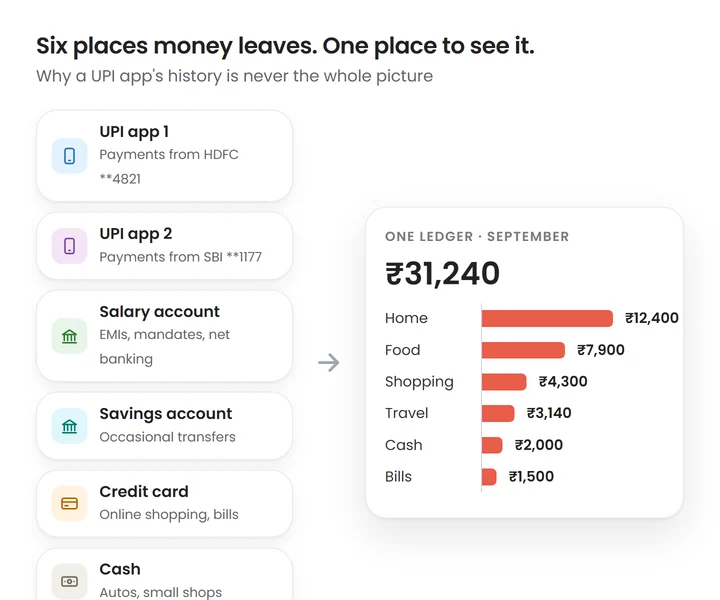
Step 1: Track from the source, not the app
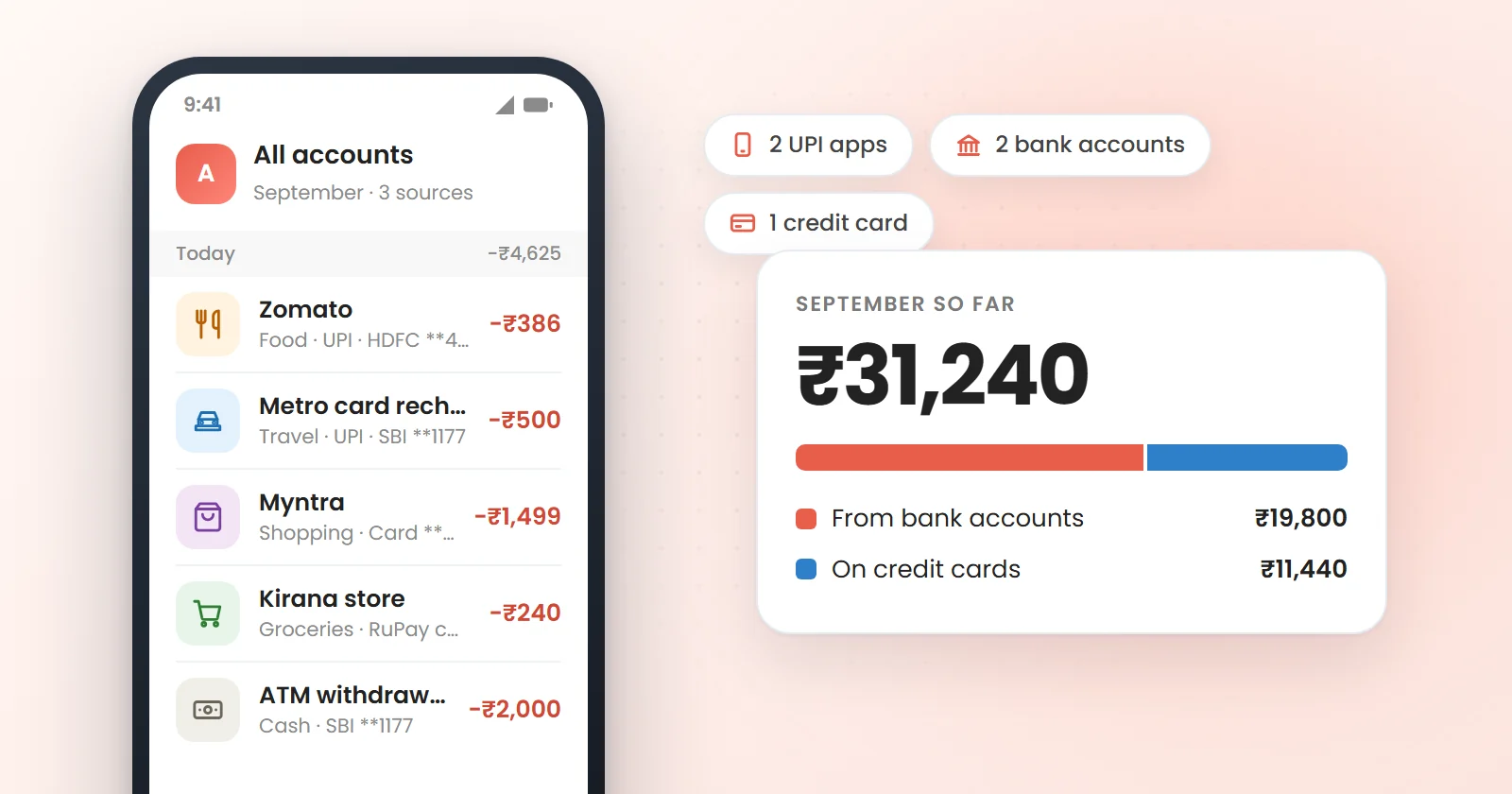
Your UPI app's history is incomplete by design. The complete record of where money left is your bank account and credit card statements, because every UPI payment, whichever app made it, debits an account or a card.
So build your picture from those sources. Either review each account and card statement weekly, or use a tracker that records transactions from your banks' SMS alerts, which covers every UPI app automatically. Our explainer on how SMS-based expense tracking works covers what that can and can't see.
Step 2: Give each account one job
Having several accounts isn't the problem; accounts without clear jobs are. A three-account setup is enough for most people:
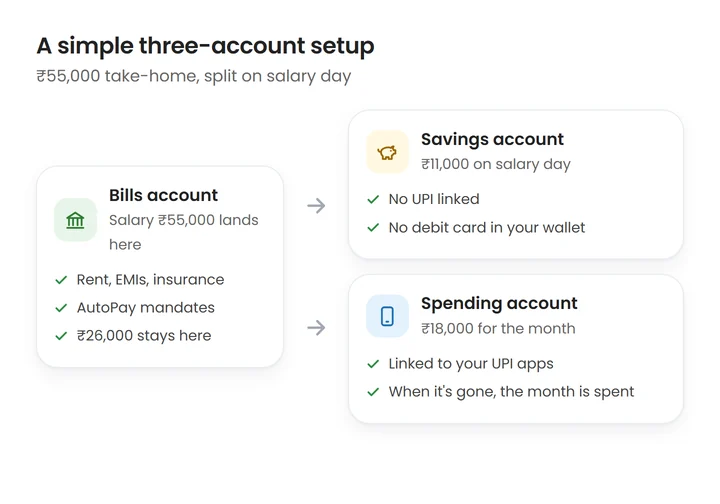
- Bills account: salary lands here; rent, EMIs, insurance and AutoPay mandates leave from here.
- Savings account: money moves in on salary day. No UPI, no debit card in your wallet.
- Spending account: your monthly spending money, linked to your UPI apps. Its balance is your remaining budget.
This works because the spending account makes your budget visible at every payment. If it has ₹4,000 left on the 20th, you know without opening a spreadsheet.
Step 3: Add a little friction to UPI
You don't need to stop using UPI; you need to make impulse payments slightly less automatic:
- Unlink savings accounts from every UPI app.
- Use one primary UPI app for everyday spending, so its history is at least mostly complete.
- Check whether your bank app lets you lower your daily UPI limit to something closer to how you actually spend.
- Be deliberate with PIN-less small payments. Features like UPI Lite are convenient for tiny amounts, which is exactly why they're easy to overuse. Keep the balance you load modest.
- Turn off payment app promotions and cashback nudges that suggest spending.
Step 4: Treat credit cards as their own column
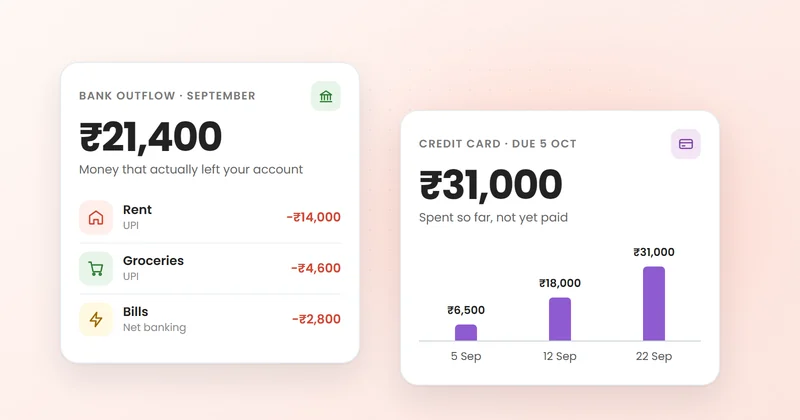
Card spending needs different handling, because the money leaves your bank weeks after you spend it:
- Count card spends in the month you make them for budgeting, not when you pay the bill.
- Watch the running card balance, not just the statement. ₹31,000 on the 22nd is worth knowing on the 22nd.
- Pay the full statement balance. Revolving a balance is expensive, and late fees come on top.
- Know which UPI payments are card spends. If you've linked a RuPay credit card to UPI, those QR payments belong in the card column.
The full reasoning, with an example, is in why credit card spending needs to be tracked separately.
Step 5: Check the combined total weekly
Once a week, look at one number: total spending this month across all accounts and cards, compared with your budget. Then check the category that moved most. If you don't have a monthly number yet, build a monthly budget first.
Small UPI payments deserve a special look, because they're the easiest to miss. Daily expense tracking explains why they add up and how to keep them in check.
Don't forget the automatic debits
AutoPay mandates and standing instructions are UPI and card spending that happen without you touching your phone. List them once, cancel what you don't use, and note the dates of the rest. The UPI AutoPay guide shows where to find them in each app.
The bottom line
UPI and cards didn't make money harder to manage; they made it harder to see. Track from your bank accounts and cards rather than individual apps, give each account one job, keep savings out of UPI's reach, treat card spends as their own column, and check the combined total every week. You keep the convenience and lose the month-end surprise.
Frequently asked questions
How do I check all my UPI transactions in one place?
Look at your bank account statements rather than a single UPI app, because every UPI payment debits an account whichever app made it. If you have several accounts, check each statement or use a tracker that reads transaction alerts from all your banks.
How can I control my UPI spending?
Give UPI access only to a spending account that holds your monthly budget, keep savings unlinked, use one main UPI app, and check your total spending weekly. Some bank apps also let you lower your daily UPI limit.
Do UPI payments made with a credit card count as card spends?
Yes. If you've linked a RuPay credit card to UPI, those payments are charged to the card and appear on its bill, so track them with your other card spending.
Is it better to have one bank account or several?
Several accounts work well if each has a clear job, such as bills, savings and spending. What causes confusion is several accounts used interchangeably for everything.
Why doesn't my UPI app show all my spending?
A UPI app only shows payments made through that app. Payments from other UPI apps, cards, net banking, AutoPay mandates and cash won't appear in it.